Introduction
Footprints can be used to transfer your logs to different sinks:
- Kafka
- Elasticsearch
- Data warehouse (MinIO, Druid)
Client SDK
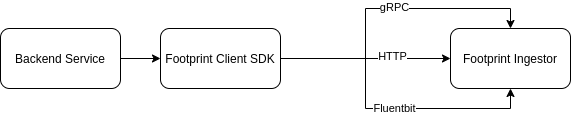
Client SDK is a library provided by Footprint developers to help facilitate the integration of your service with Footprint. It supports sending logs to footprint ingestor via 3 ways:
- Fluentbit (default): By default, the messages will be logged to stdout to be picked up by Fluentbit.
- gRPC: the messages will be sent using gRPC.
- HTTP: the messages will be sent using HTTP.
Integration Steps
Follow these steps to integrate your services:
-
Create new merge request on footprint-proto repository. Example: https://git.teko.vn/footprint/footprint-proto/-/merge_requests/199/diffs Some required details:
- Please keep your service name contains only latin characters from a-z, no dash (-) or underscore (_). For example:
footprint,discovery,merchantservice,trackingmobile. go_package:go.tekoapis.com/footprintdto/golang/servicename/v1.java_package:vn.teko.footprint.servicename.v1.java_outer_classname:CamelCaseClassName.java_multiple_files:true.
Your logs will be the first message in the proto definition. For example: PageView is the message we need to track.
- Please keep your service name contains only latin characters from a-z, no dash (-) or underscore (_). For example:
-
Once the merge request is merged, you need to use client_sdk to send logs to the footprint platform
-
Contact footprint team via #footprint-support channel to provision the sink need to send logs to (Elasticsearch, Kafka, DWH, etc)
Supported backend languages:
GO
Python
Java
Coming soon
JavaScript
Not supported
Swift
Not supported
For importing rpc.tekoapis.com proto to footprint proto
Adding these two lines of code below to integrate your rpc proto in repo https://git.teko.vn/shared/rpc to footprint-proto.
...

option (footprint.v1.is_footprint_proto) = true;

import "footprint/v1/is_footprint_proto_extension.proto";

...
Note:
- You only need to add that 2 two lines in the “root” proto file. All the imported file below will be automatically added.
- You have to ensure that the “root” proto and all the relevant files (imported files) had all the required details mentioned above (go_package, java_package, java_outer_classname, java_multiple_files options).
After that change is merged to branch master, in your footprint proto, you can now import your rpc proto.
...

import "rpc/payment/v2/error.proto";

...

  rpc.payment.v2.PaymentError payment_error = 23;

...
where rpc is the default prefix. payment.v2.xxx is your definition.