Preparation
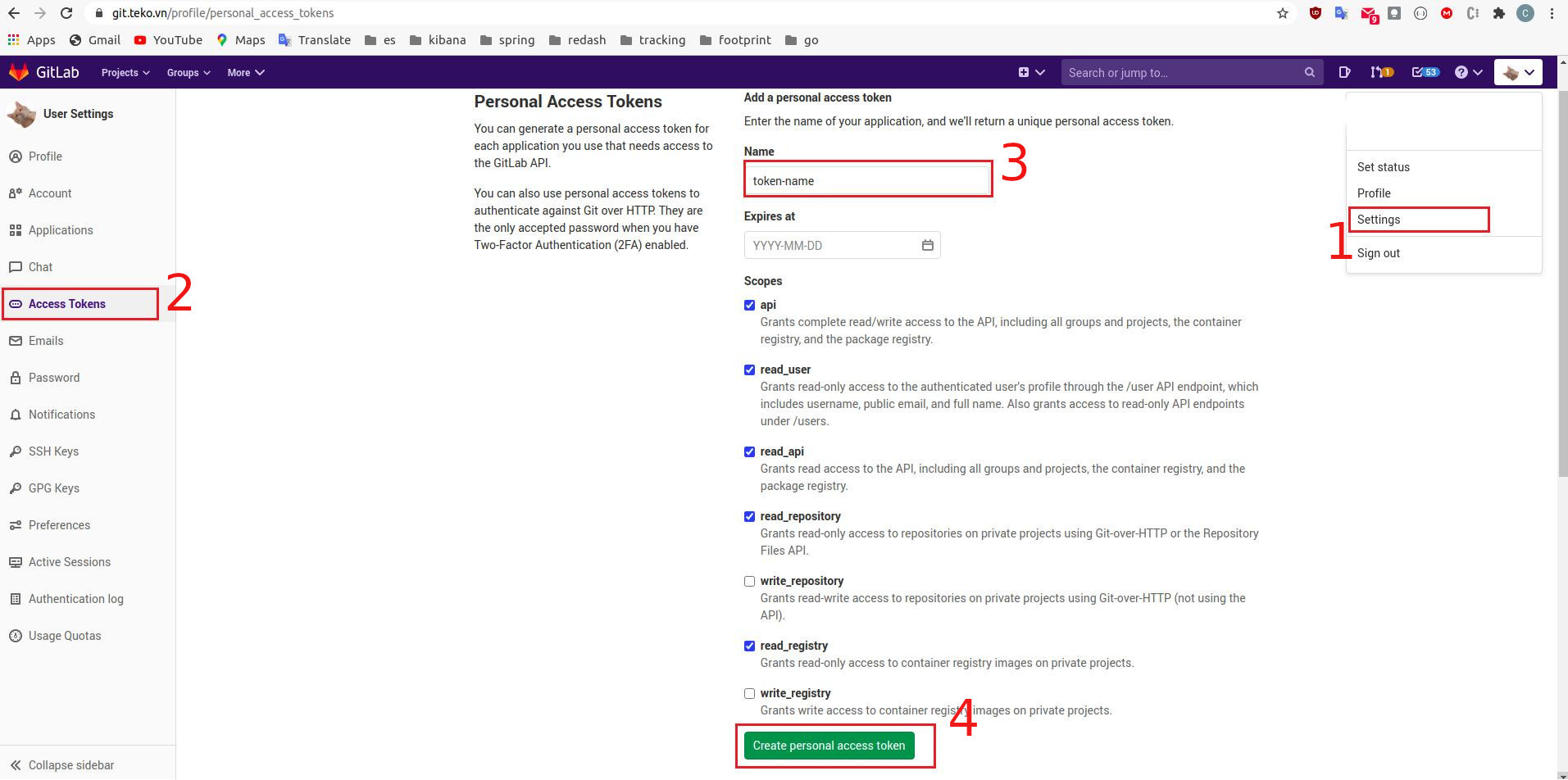
Create gitlab access token
Installation
Maven
Copy and paste this inside your pom.xml dependencies block.
<dependency>
  <groupId>vn.teko.data.footprint.rpc</groupId>
  <artifactId>footprint-dto</artifactId>
  <version>set-your-version-here</version>
</dependency>
Maven command
mvn dependency:get -Dartifact=vn.teko.data.footprint.rpc:footprint-dto:<set-your-version-here>
Registry setup
If you haven’t already done so, you will need to add the below to your pom.xml file.
<repositories>
  <repository>
    <id>gitlab-maven</id>
    <url>https://git.teko.vn/api/v4/projects/1518/packages/maven</url>
  </repository>
</repositories>

<distributionManagement>
  <repository>
    <id>gitlab-maven</id>
    <url>https://git.teko.vn/api/v4/projects/1518/packages/maven</url>
  </repository>

  <snapshotRepository>
    <id>gitlab-maven</id>
    <url>https://git.teko.vn/api/v4/projects/1518/packages/maven</url>
  </snapshotRepository>
Gradle
Fill access token created above into gradle.properties
# gradle.properties
gitLabPrivateToken=<your-token-here>
footprintDtoVersion=<version>
Add maven repository
allprojects {
    repositories {
        ...
        maven {
            url "https://git.teko.vn/api/v4/projects/1518/packages/maven"
            name "GitLab"
            credentials(HttpHeaderCredentials) {
              name = 'Private-Token'
              value = gitLabPrivateToken // setup in gradle.properties
            }
            authentication {
              header(HttpHeaderAuthentication)
            }
        }
        ...
    }

    ...

    dependencies {
        implementation "vn.teko.data.footprint.rpc:footprint-dto:$footprintDtoVersion"
    }
}
Packages
All versions can be found at here
Note: Version with suffix -lite is for java-lite (usually using on android)
How to use
Example for java
import vn.teko.data.footprint.v1.rpc.LogEntry;
import vn.teko.data.tracking.v3.rpc.AlertEvent;
import vn.teko.data.tracking.v3.rpc.AlertEventLogEntry;

public class Test {
    public static void main(String[] args) {
        // Create an event
        AlertEvent alertEvent = AlertEvent.newBuilder()
                .setAppId("132")
                .setSchemaName("schema name")
                .build();

        // Wrap event into log entry
        LogEntry logEntry = AlertEventLogEntry.build(alertEvent, System.currentTimeMillis());

        // Marshal logEntry to json and send to server

    }
}
Example for java-lite.
Cause when using java-lite, cannot convert proto message into json. So, we add one method to do that.
import vn.teko.data.footprint.v1.rpc.LogEntry;
import vn.teko.data.tracking.v3.rpc.AlertEvent;
import vn.teko.data.tracking.v3.rpc.AlertEventLogEntry;
import vn.teko.data.utils.LogEntryV1Utils;

public class Test {
    public static void main(String[] args) {
        // Create an event
        AlertEvent alertEvent = AlertEvent.newBuilder()
                .setAppId("132")
                .setSchemaName("schema name")
                .build();

        // Wrap event into log entry
        LogEntry logEntry = AlertEventLogEntry.build(alertEvent, System.currentTimeMillis());

        // Marshal logEntry to json
        String logEntryJson = LogEntryV1Utils.convertToJsonString(logEntry);

        // And then, send it into footprint server

    }
}